
SG Wireless
sgwireless.com
  • Home
  • Product Information
    • F1 Smart Module
      • Introduction
        • Key Features
        • Order Information
      • General Features
        • Feature Specifications
      • Pinout & Pin Definitions
        • Pin Definitions
      • Electrical Specifications
        • Rating & Operating Conditions
        • WiFi
        • Bluetooth
        • LTE
        • LoRa(WAN)
      • Module Interface
        • Power Management
        • Memory Allocation
      • Mechanical Specifications
        • Module Dimensions
        • Recommended PCB Landing Pattern
        • Recommended Soldering Profile
      • MicroPython
        • Device Programming via UART
        • Module-supported Libraries
      • Product Packaging
      • Revision History
      • Certification
    • F1 Starter Kit
      • Introduction
        • What Makes the F1 Starter Kit Unique
        • What to Expect in Development
      • Features
        • Connectivity
        • Microprocessor
        • Memory
        • Peripherals
        • On-board Peripherals
        • Arduino UNO Shield Compatible Expansion
        • Power
      • Starter Kit Overview
        • Block Diagram
        • Starter Kit Topology — Top View
        • Starter Kit Topology — Bottom View
      • Pinout & Pin Definitions
        • Pin Definitions
      • Board Operation
  • Getting Started
    • Unboxing your Starter Kit
    • Introducing VS CtrlR
      • Installing VS CtrlR Plugin
      • Configuring F1 Starter Kit for CtrlR Plugin on your PC
      • Next Steps
    • Zero-Touch Provisioning (ZTP)
      • Regional Coverage
      • Provisioning Steps
      • Next Steps
    • Manual Provisioning for F1
      • Prerequisites
      • Provisioning Steps
        • Part 1 – Configure your network profile
        • Part 2 – Add your F1 Starter Kit
        • Part 3 – Configure your F1 Starter Kit Network
        • Part 4 – Deploy to your F1 Starter Kit
    • Your First Sensor Data
      • Add your CAP/T Sensor
      • Link your CAP/T Sensor to your F1 Starter Kit
      • Map your CAP/T Sensor data
      • Next Steps
    • Your First F1 Code
      • Resetting the Device
        • Hard reset
        • Soft reboot
  • Taking Ctrl
    • Let’s get started!
      • Managing Projects
        • Project Components
        • Add Project
        • Switch Project
        • Edit Project
        • Delete Project
      • Managing Networks
        • Manage Network Profiles
        • Manage Device Network Settings
      • Account Settings
        • Update Personal Account Settings
        • Update Organization Settings
      • Managing Devices
        • Next Steps
      • Visualize Data
        • Step 1: Set up a CtrlR Project
        • Step 2: Monitor a signal from your device
        • Done!
      • Sensors
        • Add a Sensor to Ctrl
        • Update Sensor Information
        • Remove a Sensor from Ctrl
        • Link Sensor to a Device
        • Unlink Sensor from a Device
      • Integrations
        • Webhook
        • AWS IoT Core
        • Azure IoT Hub
  • Custom Projects
    • Creating Custom Projects
      • Creating a data upload project in CtrlR
      • Visualizing data on Ctrl
    • Programming the Basics
      • Light up the Onboard RGB LED
      • Creating a project in CtrlR
      • Uploading code to your F1 Starter Kit
    • Setting up Custom Networks
      • Ctrl connection status
      • Configure for CAT-M1 or NB-IoT
      • Customize APN
  • Tutorials & Examples
    • Basic Tutorials
      • REPL
        • Resetting the Device
        • REPL control commands
        • Boot modes
      • Sleep
        • Basic sleep
        • Power saving
        • Wake up reason
      • Print
      • RGB LED
        • rgbled.color()
        • rgbled.heartbeat()
        • rgbled.decoration()
        • rgbled._color
      • GPIO
        • Output
        • Input
    • Hardware Tutorials
      • ADC
      • I2C
        • Drivers for the BH1750FVI
      • Timers
        • Timer
    • Network Tutorials
      • WiFi
        • Connected by Devices (Act as an AP)
        • Connecting to a Router (Act as a Device)
        • Using an external antenna
      • BLE
      • LoRa Examples
        • LoRaWAN with OTAA
        • LoRaWAN with ABP
        • LoRa-MAC (Raw LoRa)
      • LTE Examples
        • General remarks
        • SG SIM card
        • LTE Connectivity check
        • LTE Mode check and LTE Mode switching
        • Custom APN setting
  • Firmware & API Reference
    • SG Modules
      • Ctrl Client API Documentation
        • Configuration
        • Connection
        • Signals
        • Miscellaneous
        • Examples
      • LoRa API Documentation
        • Initialization
        • LoRa Modes
        • LoRa Test stub
        • LoRa Events and Callbacks
        • LoRa RAW APIs
        • LoRa WAN APIs
      • LoRa WAN API Documentation
        • Available LoRa WAN APIs Summary
        • LoRa WAN Stats
        • Setting LoraWAN parameters
        • Device commissioning
        • Join
        • Sending data
        • Receiving Data
        • LoRa Ports
        • Callbacks lora.callback()
        • Duty cycle operations
        • RX listening
      • LoRa RAW API Documentation
        • Available LoRa RAW APIs Summary
        • LoRa Raw Settings
        • Modifying Radio Parameters
        • Setting LoRa RAW user Callback
        • Send (TX) Data
        • Receive (RX) Data
        • RX Continuous Mode
        • Continuous TX Wave mode
      • LoRa Callback System
        • Introduction
        • LoRa Events
        • LoRa Callback Generic Interface
        • Example LoRa-RAW
        • Example LoRa-WAN
        • Remarks
      • LTE
        • Constructors
        • Methods
        • Constants
      • RGB LED
        • rgbled.decoration()
  • Contact
  • License
SG Wireless
  • Home
  • Edit on GitHub

Welcome to the SG Document Hub

Get ready…

Here we have everything in one place to get you started on your IoT journey.

  • IoT newbies can follow our Getting Started guide from unboxing to prototyping.
  • Seasoned pros can find more in-depth instructions in Tutorials & Examples.

Should you have any questions, we are only one message away and always happy to help.
Get ready

F1 Smart Module

The go-to for enterprise IoT solutions requiring flexible multi-network connectivity (BLE, WiFi, LoRa and LTE) and rapid deployment and scaling.
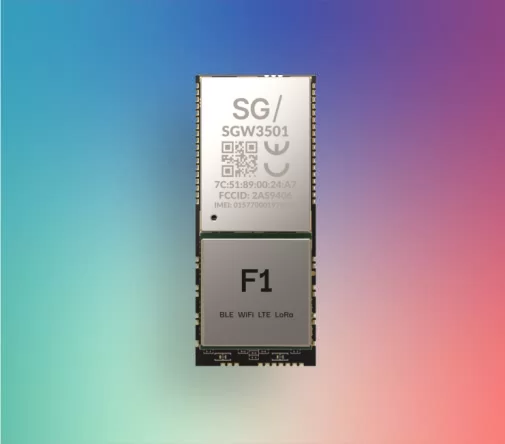
F1 Smart Module

Ctrl. Cloud Platform

The all-in-one Cloud Platform that lets you configure, deploy, and manage your devices to give you full Ctrl. over your IoT networks.
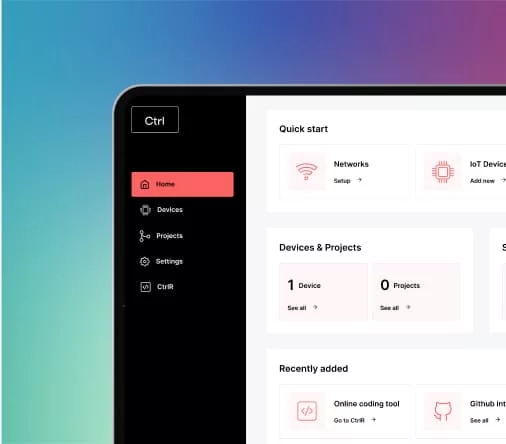
Ctrl. Cloud Platform

Product Information

Get to know each component of our IoT ecosystem.

Tutorials

Get to work! Follow tried-and-true examples of our products in deployment.

API Documentation

Get to understand how our product works and how to configure it to work for you.

Next

© Copyright 2026, SG Wireless - All Rights Reserved.

Built with Sphinx using a theme provided by Read the Docs.
v: v1.3.0
Versions
v1.4.0 (latest)
v1.3.0
Downloads
PDF
External Links
sgwireless.com
GitHub