
WiFi
The WLAN (WiFi) is a system feature of all SG devices, therefore it is enabled by default. The development boards include an on-board antenna by default, so no external antenna is needed to get started. When deploying your solution, you might want to consider using the external antenna to increase the wireless range.
On this page, we cover:
Connected by devices (act as an AP)
Connecting to a router (act as a Device)
Using an external antenna
Note
Generally, code in either section is applicable to both WLAN modes.
Connected by Devices (Act as an AP)
Using the WLAN class from network, you can change the name (SSID) and security
settings (auth) of the access point.
import network

ap = network.WLAN(network.AP_IF)        # create access-point interface
ap.config(essid='ESP-AP')               # set the ESSID of the access point
ap.config(password='micropython')
ap.config(authmode=network.AUTH_WPA2_PSK)
ap.config(max_clients=10)               # set how many clients can connect
ap.active(True)                         # activate the interface
The device will not be able to access the internet, but you will be able to run a
simple webserver. By default, the IP address will be configured to
192.168.4.1.
Connecting to a Router (Act as a Device)
To connect to an existing network, the WiFi class must be configured as a station:
import network

wlan = network.WLAN(network.STA_IF)  # create station interface
wlan.active(True)                    # activate the interface
wlan.scan()                          # scan for access points
wlan.isconnected()                   # check if connected to an AP
wlan.connect('essid', 'password')    # connect to an AP
wlan.config('mac')                   # get the interface's MAC address
wlan.ifconfig()                      # get IP/netmask/gw/DNS addresses
Note
For more details on the WLAN class, please refer to the MicroPython WLAN documentation.
Using an external antenna
Connect a WiFi antenna to the microwave SWF type switch connector on your development board in order to use an external antenna for WiFi.
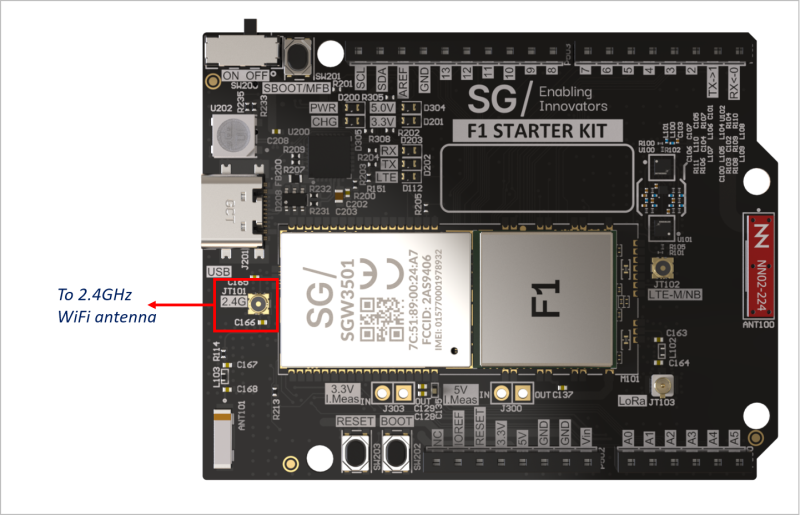
The microwave SWF type switch connector is a hardware connector with switch. By default, it is connected to the on-board Wi-Fi chip antenna. If an external antenna is connected to the SWF type switch connector, it will switch to the external antenna and is isolated from the default on-board Wi-Fi chip antenna.
Note
Since BLE and Wi-Fi share the same RF path, if an external antenna is connected both Wi-Fi and BLE signals will go through the external antenna.